Media Center
Purpose
When I first moved into the house I’m at now, the internet service we had wasn’t great, and when you have children that thoroughly enjoy watching Disney and other kids content, not being able to stream isn’t fun. Especially if you don’t want to hassle with having DVD players and scratched DVDs. The purpose for this Media Center application is simply for offline viewing of video content within a home. This enables you watch whatever video content you have saved on a server or computer in your home on any TV or device that has a browser and is connect to the same network. Yes, I know Plex exist, but I wanted to make something myself.
The Application
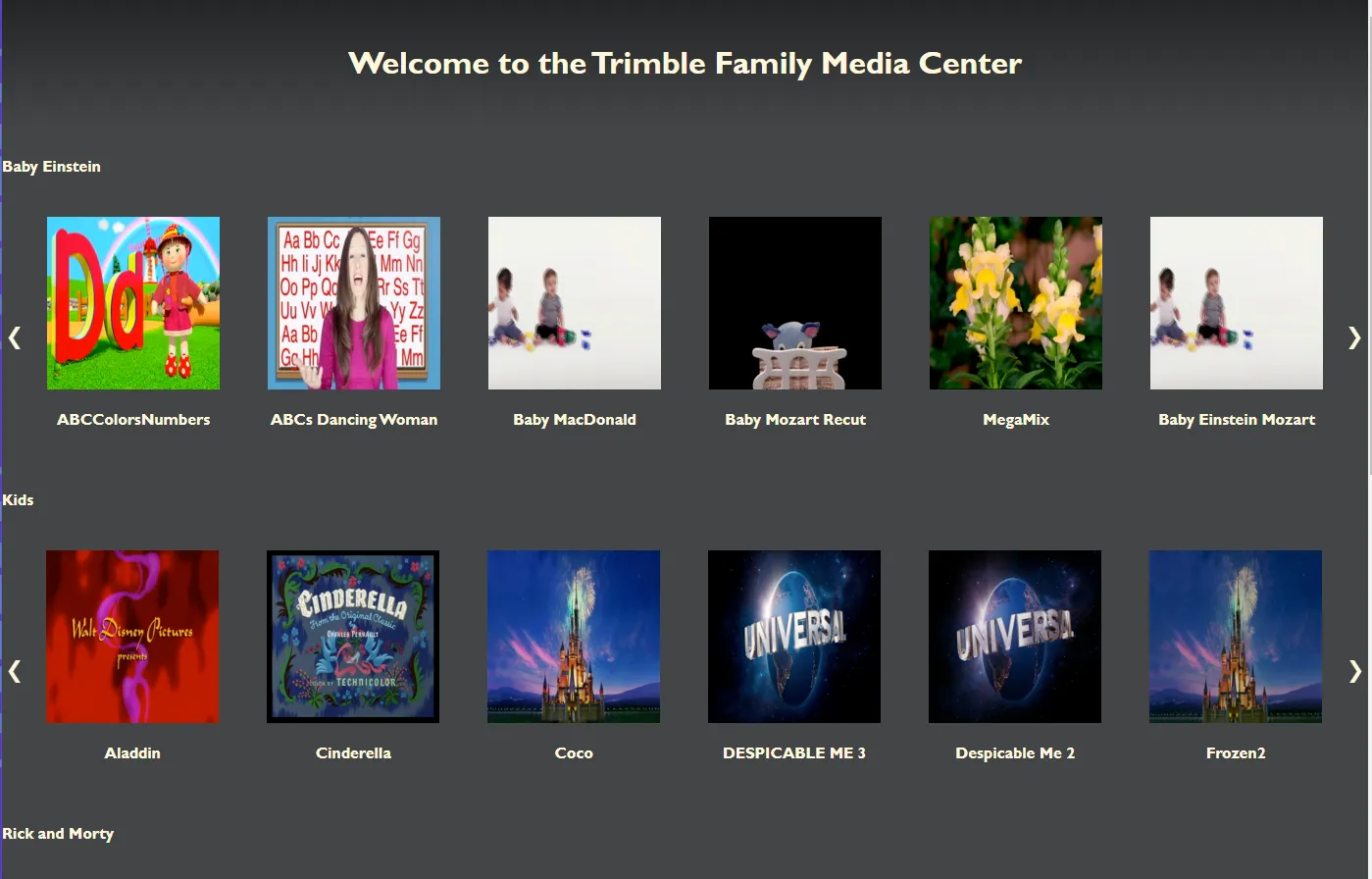
This is a Home Media Center app built with NodeJS, Express, ffmpeg, and MongoDB. When I first decided to create this application, using Node was a no-brainer. I had just taken a course on it, and was wanting a good sizable project to work on. Express was a solid front runner for a framework that would ease the speed at which I wrote. MongoDB is an obvious pair as well, and I liked having a non relational database to work with. I brought ffmpeg in closer to the end when I needed a way to grab an image for the videos. In retropect, using an API to pull an image of the actual artwork would have been better (and easier). It was originally written using ejs, but I had rewritten the frontend to use React that is identical to the original way the page looked.
The application is pretty simple to use once setup. You define a few envrionment variables: The port to run on, the path to where the videos and photos are location(They can be on another harddrive, or another machine even if you wanted). To add a row or category you add a folder to the root folder of the videos directory and place videos in it. When the application starts up it scans the directory and for each video it confirms that video is in the database. If it comes to a video that isn’t, it takes a screenshot from whatever is 20 seconds into the video and created the database entry. I have about 500 videos currently, and it reads through them in under a second at start up still.
To access you just put in the IP and port of the host device, like 192.168.1.20:3000 and it comes up to the home page. From there you can choose whatever video you want. I fit the screen as much as possible, but all major browsers prevent application from going full screen on their on, but clicking anywhere on the screen within 5 seconds of the video starting will go full screen. Once the video comes to the end it automatically fetches the next video in that catergory. The database entry is also updated every 10 seconds with the current time into the video so it can be viewed again later. You can just choose “Resume” when you select you video chose.
Results
I’ve purchased and borrowed a lot of DVDs including all of The Office and Friends, and now we can watch whatever content we have whenever. This is especially helpful with children when they get hooked on a specific movie. I know I could have used something out of the box with a better feature set, but this project had a clear useful purpose and allowed me to really stretch my learning. This application was made long before I knew what a container was, but that would have been a better use case for it. It’s been a while since we’ve had to run this app in our home, but I’m so glad I pushed through to make it.
For more information on the setup see the readme https://github.com/devJeremyt/MediaCenter.
Archived project, carried over from my old site.